LocalMonero will be winding down
The winding down process begins May 7th, 2024, and finishes after November 7th, 2024. Our support staff will be available for help throughout this period.
- Effective immediately, all new signups and ad postings are disabled;
- On May 14th, 2024, new trades will be disabled as well;
- After November 7th, 2024, the website will be taken down. Please reclaim any funds from your arbitration bond wallet prior to that date, otherwise the funds may be considered abandoned/forfeited.
니모닉 시드에서 비 보관 결제 지갑을 복원하는 방법은 무엇입니까?
공식 GUI 지갑 사용
- getmonero.org 에서 OS용 Monero GUI 지갑의 최신 버전을 다운로드하고 실행합니다.
- 원하는 지갑 모드를 선택한 다음 "키 또는 니모닉 시드에서 지갑 복원"을 선택하십시오.
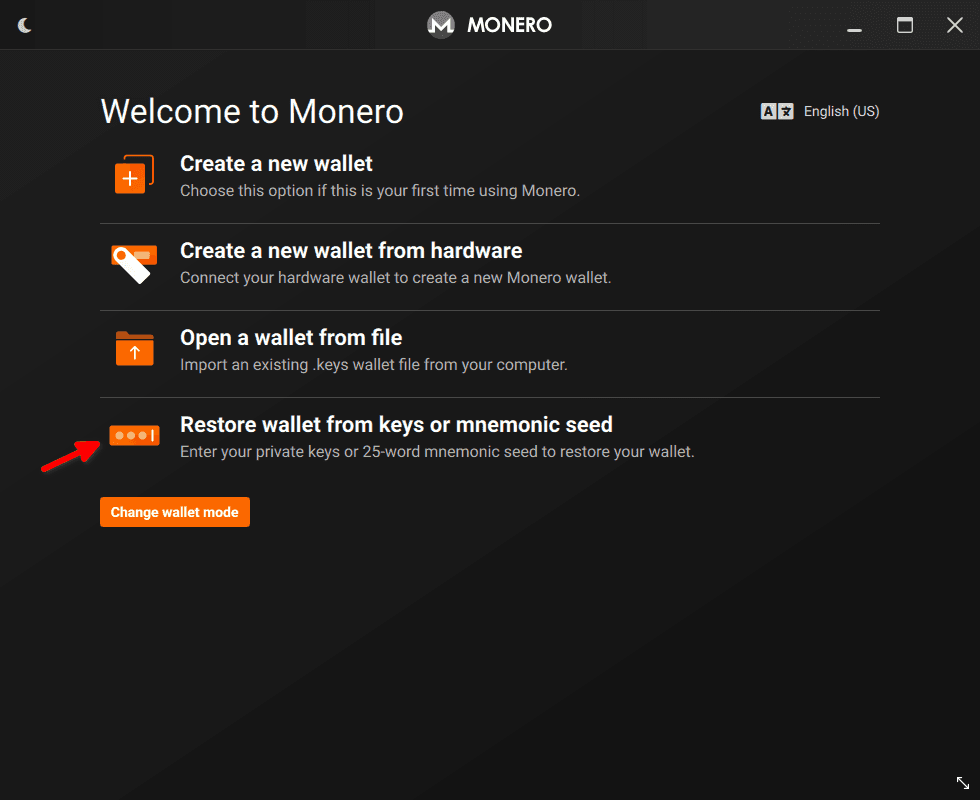
- "시드에서 복원"(기본적으로 선택됨)을 선택하고 거래 페이지의 니모닉 시드를 아래 입력에 붙여넣습니다. 그런 다음 "Seed offset passphrase"를 선택하고 거래를 완료할 때 사용한 LocalMonero 비밀번호를 입력하십시오. "다음"을 누릅니다.

- 그게 다야! 지갑이 동기화되면 "거래" 탭 아래에 모든 거래가 표시됩니다.
공식 CLI 지갑 사용
- getmonero.org에서 OS용 Monero CLI 지갑의 최신 버전을 다운로드합니다.
- --restore-from-seed 플래그로 지갑을 시작합니다.monero-wallet-cli --restore-from-seed
- 원하는 지갑 이름을 입력하세요.
- "Electrum seed 지정"메시지가 표시되면 거래 페이지에서 니모닉 시드를 붙여넣습니다.
- "시드 오프셋 암호를 입력하십시오"라는 메시지가 표시되면 거래를 완료할 때 사용한 LocalMonero 비밀번호를 입력합니다.
- 다음 질문에 원하는 대로 답하십시오.
- 그게 다야! 지갑이 동기화되면 show_transfers 명령을 사용하여 모든 거래를 볼 수 있습니다.